In this section, the high-level execution flow of the Email Campaign Manager is described as a step-by-step process from an infrastructural perspective, using a load balanced two server setup and a dedicated ECM dispatch server.
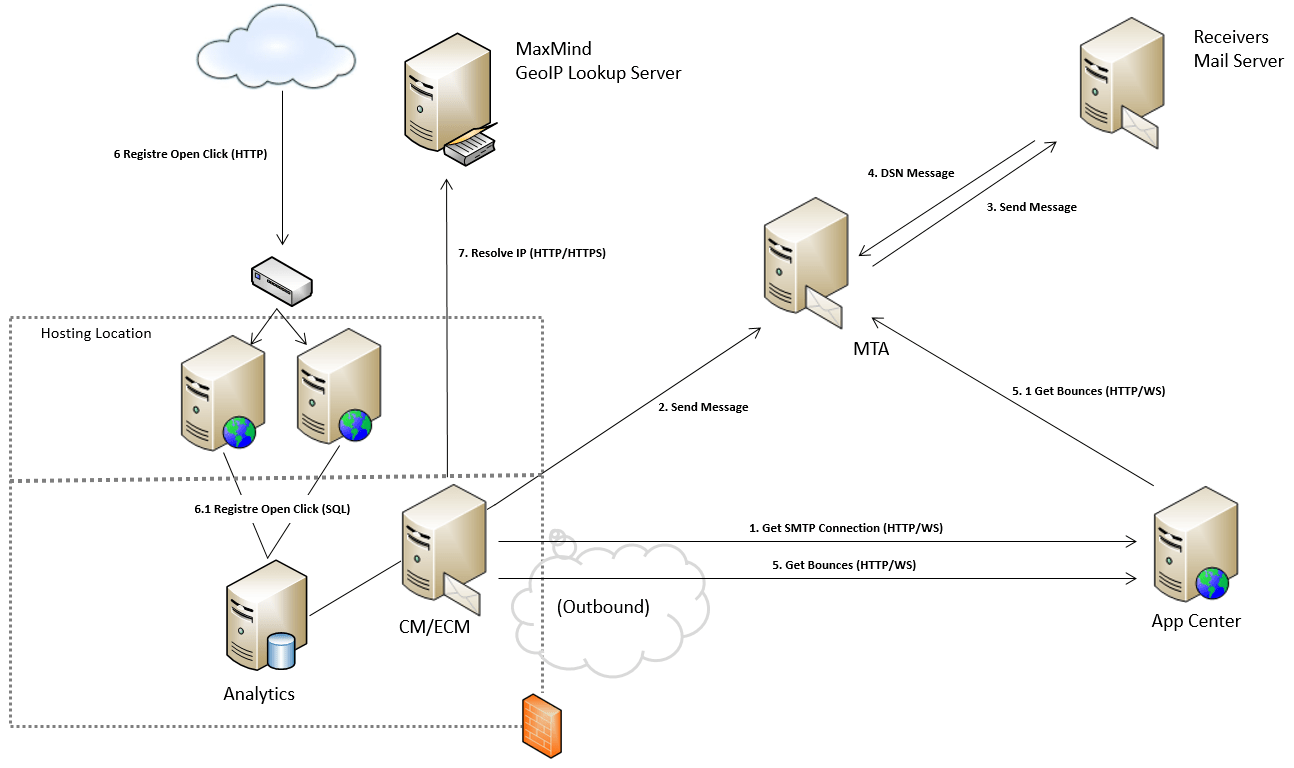
To support the description, the flow itself is illustrated in the Figure.
 Initially, the Email Marketer will create an email campaign with may contain content shared with the content management and delivery servers through the content database.
- The Sitecore ECM Server uses a HTTP/WS connection to request the Sitecore App Center (Sitecore) for a SMTP end-point connection. The Sitecore App Center authenticate the requests and sends a reply containing the endpoint connection according to the account specific configuration settings.To verify the caller, the setup requires that a ‘customerspf.sitecore.net’ SPF record is added to the DNS Setup add to ‘Outsourced Domains, along with the sender domains.
- Once received, the Sitecore ECM Server on premise uses the end-point connection to dispatch the messages through the DYN Message Transfer Agent (DYN) (local SMTP cannot be used, since it is not geared towards large campaigns, hence this could compromise other business applications.)
- If accepted, the messages originating from the ECM Server is white-labeled and forwarded to their destination (the receiver’s mail server or user agents).
- Once received, the MTA is used to track each activity and analyzing and storing the recipient list to perform future routing functions. This also includes sending auto-responses about no delivery when a message does not reach its intended destination.
- In a configurable scheduled interval, the Sitecore ECM will poll the Sitecore App Center for the analytics and email intelligence collected through the MTA.
- The Sitecore App center forwards the request to the MTA server to collect the requested analytics in a specific date interval.
- Meanwhile, the Content Delivery Servers receives open-rates and click rates. Sitecore ECM tracks opens by placing a single-pixel-sized image in each email. When someone views images in the email, the image-hosting servers (Content Delivery Server) get a request for the pixel-sized pic encoded with a campaign and recipient identifier. The request will also contain the IP address of the recipient, which also needs to be enclosed into the relay of the register open request.
- The Content Delivery Server relays the single-pixel request to the data server, which to track opens for each subscriber as state representation in a campaign specific Sitecore Engagement Plans.
- The ECM server later picks up the registered open clicks and moves this into the analytics capture database.
- In a background scheduler, the ECM uses to IP-address request information about the recipient’s IP address to look up and match these against a geographical location. This is done by calls to geoip.maxmind.com port 80 (http://geoip.maxmind.com/) or port 443 (https://geoip.maxmind.com/). Where it is the HTTPS must be used, since it will encrypt the license key and the IP address you are looking up
 MY-BIPOLAR
Leave a comment